
Generate a Password in Seconds
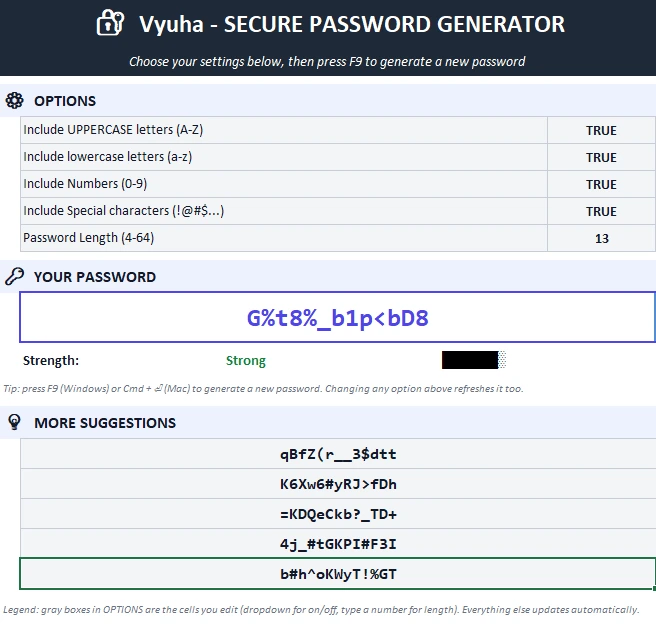
Press F9 and get a brand-new, fully random password instantly — instead of typing out "Password123!" one more time.
Vyuha generates strong, fully random passwords right inside Excel — pick your length, choose your character mix, and get a brand-new password in one keypress. No app to install, no account to create, nothing sent over the internet.
Works on Windows · opens instantly, nothing to install · a plain spreadsheet, no macros or executables.
After downloading, confirm the file hasn't been altered. Run this in PowerShell:
Get-FileHash Vyuha.zip -Algorithm SHA256
The result should match:
77ED584DABCA290F43F12AD1EE3E198DB665AF09C1D5637E5997BBE325230B74

Built on well-established password-strength principles
Runs 100% offline — nothing you generate is ever sent anywhere
One-time payment — yours to keep, no renewal
Vyuha takes the guesswork out of "is this password good enough?" — while keeping full control in your hands.
Press F9 and get a brand-new, fully random password instantly — instead of typing out "Password123!" one more time.
Length and character variety are exactly what security guidance points to as the biggest factors in password strength — Vyuha gives you full control over both.
Toggle uppercase, lowercase, numbers, and symbols on or off independently — some sites won't accept symbols, so you're not stuck with a one-size-fits-all generator.
Every generation gives you one main password plus five backup suggestions, so you can pick whichever one you like best.
Every password is generated with plain, visible spreadsheet formulas — no macros, no hidden scripts, nothing you can't inspect yourself.
A single one-time payment — no subscription, no renewal, no surprise charge next year.
Windows — anything that runs Microsoft Excel
Under 1 MB
Microsoft Excel 2021 or newer
Less than 1 MB free space needed
Pay once, use it for as long as you like — no yearly renewal.
Questions before you buy? Talk to us or read our Refund & Return Policy.
What our customers are saying...
[Sample review — replace with a genuine customer quote]
[Sample review — replace with a genuine customer quote]
[Sample review — replace with a genuine customer quote]
Yes — every payment through our checkout page can be issued as a proper invoice. Message us on WhatsApp or email if you need it addressed to a specific name or business.
Get in touch on WhatsApp or email support@exceldays.lk and we'll arrange a payment method that works for you.
No. Once downloaded, Vyuha runs entirely offline — every password is generated locally inside the spreadsheet, nothing is transmitted anywhere.
Message us and we'll walk you through a short screen-share demo so you can see exactly how it behaves before you commit.
Yes. It's a plain spreadsheet built entirely from standard formulas — no macros, no VBA, no executables. If your organization requires a security review before approval, let us know and we'll provide details.
Vyuha works anywhere Microsoft Excel runs. Get in touch and we'll answer any question before you buy.